TalkEase 
An app design for real-time multilingual communication using AI translation.

Overview
TalkEase started with a simple idea: what would a translation app look and feel like if it were designed around the conversation experience first? Rather than creating another version of existing translation tools, I wanted to explore how research-driven design decisions could shape the experience of an everyday product.
This project took me through the entire UX design process, from user research and analysis to a high-fidelity prototype in Figma. Along the way, I focused on understanding the challenges faced by people who encounter language barriers in their daily lives, whether in classrooms, workplaces, or casual social interactions, and used those insights to guide each design decision.
Problem
Language barriers can make everyday conversations difficult, whether in classrooms, workplaces, or social settings. While translation apps help bridge that gap, they can sometimes interrupt the conversation itself. I wanted to explore how a translation app could better support the conversation experience, helping people communicate more naturally and smoothly in everyday situations.
The Design Question
What does a translation app feel like when it's built around how people actually talk to each other, rather than how they look up words?
Solution
I designed a mobile translation app prototype around the conversation experience, focusing on simple navigation, quick access to saved phrases, and making core features easy to find and use without instructions.
User Research & Insights
To better understand the problem, I conducted surveys and interviews with people who regularly face language barriers in everyday situations. Four key themes consistently emerged from the research.
Accents over vocabulary
Understanding accents is harder than understanding unfamiliar words for most multilingual users.
Lost in translation
Cultural meaning gets lost in most translation tools, so even correct words can cause misunderstandings.
Real-time translation
People want real-time translations that work in classrooms, workplaces, and casual conversations.
Simplicity under pressure
When language is a barrier, users need an app they can use instantly without learning it first.
Personas
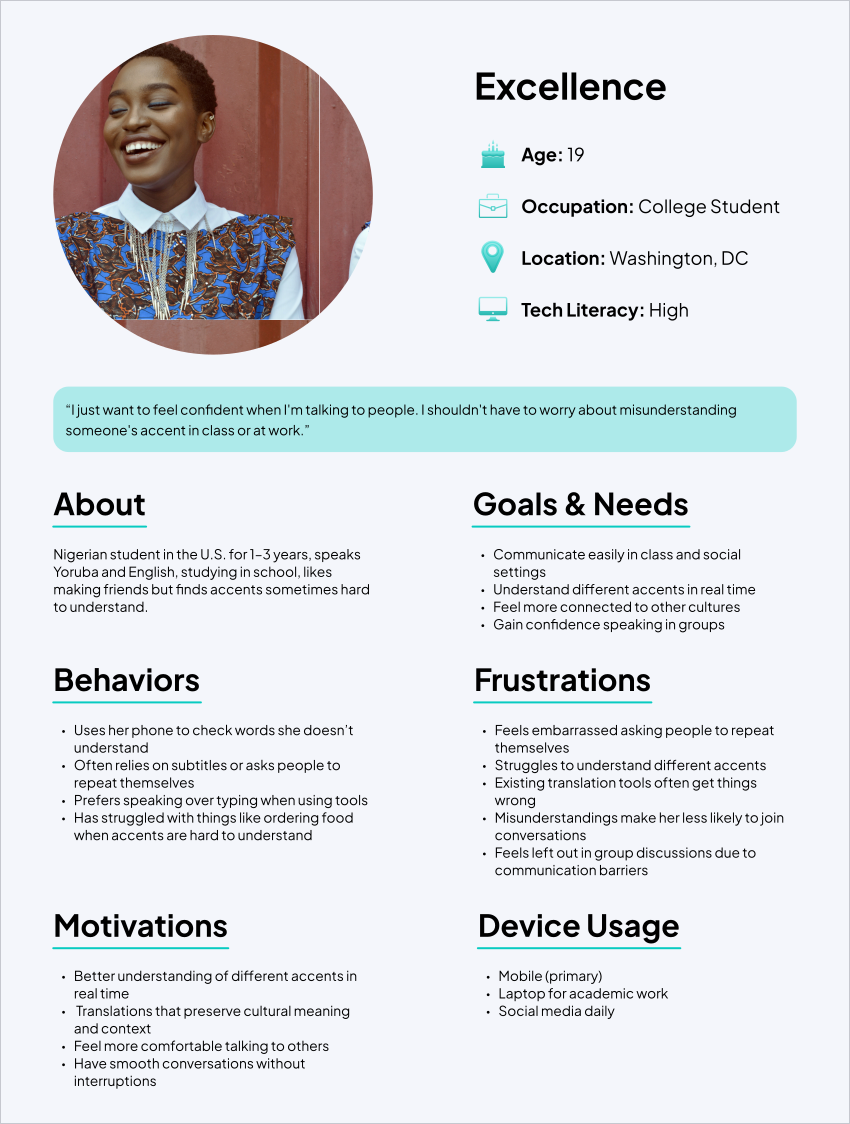
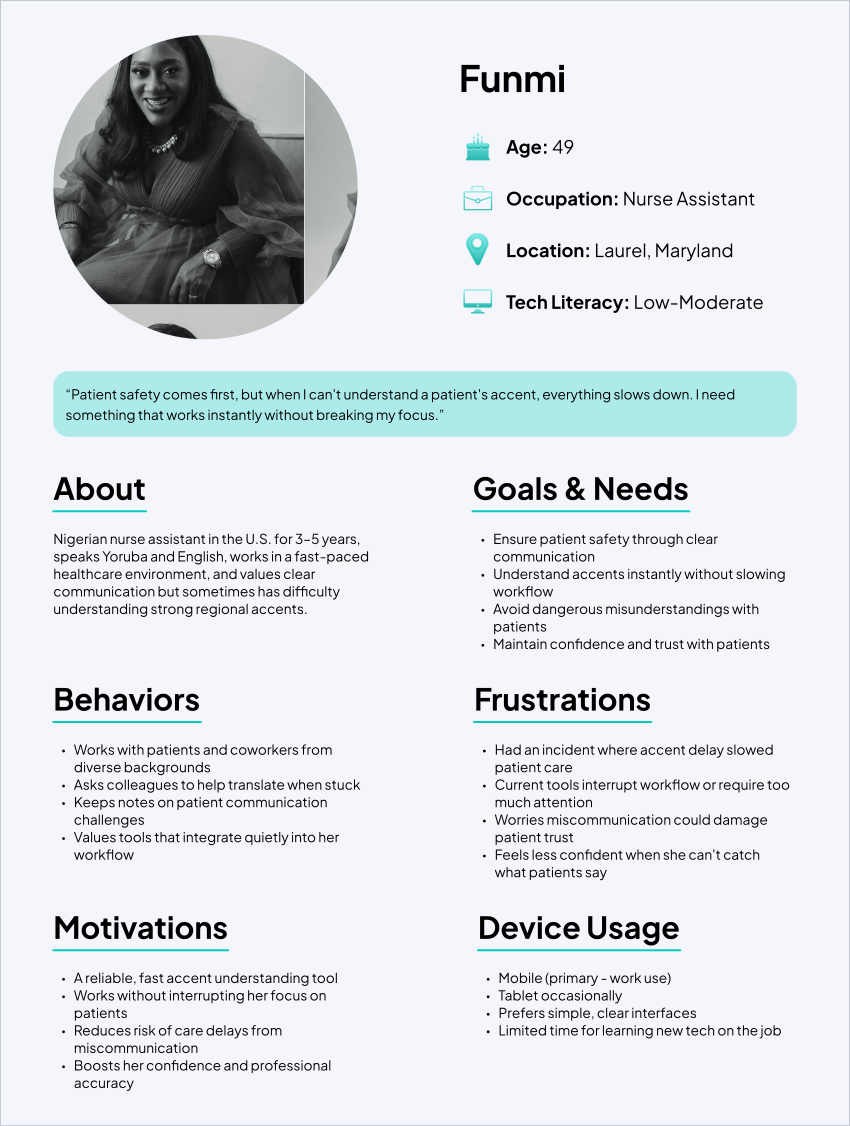
Using insights from the research, I created personas to better understand the different needs, goals, and challenges of potential TalkEase users.
Design & Prototyping
Based on the research, I built a high-fidelity Figma prototype featuring six core features. Rather than focusing on the translation technology itself, I focused on how the app would support users during live conversations. I also chose a purple color palette to create a calmer, more approachable experience than a typical utility app.

Instant voice & text translation
Translate spoken and typed messages instantly with a language selector that stays active. Designed for fast, smooth conversations in real time.

Camera-based translation
Point the camera at documents, signs, or menus to get instant translations without any typing.

Favorites
Save commonly used phrases for quick one-tap access, placed on the main screen instead of hidden in settings like most translation apps.
Interaction Design
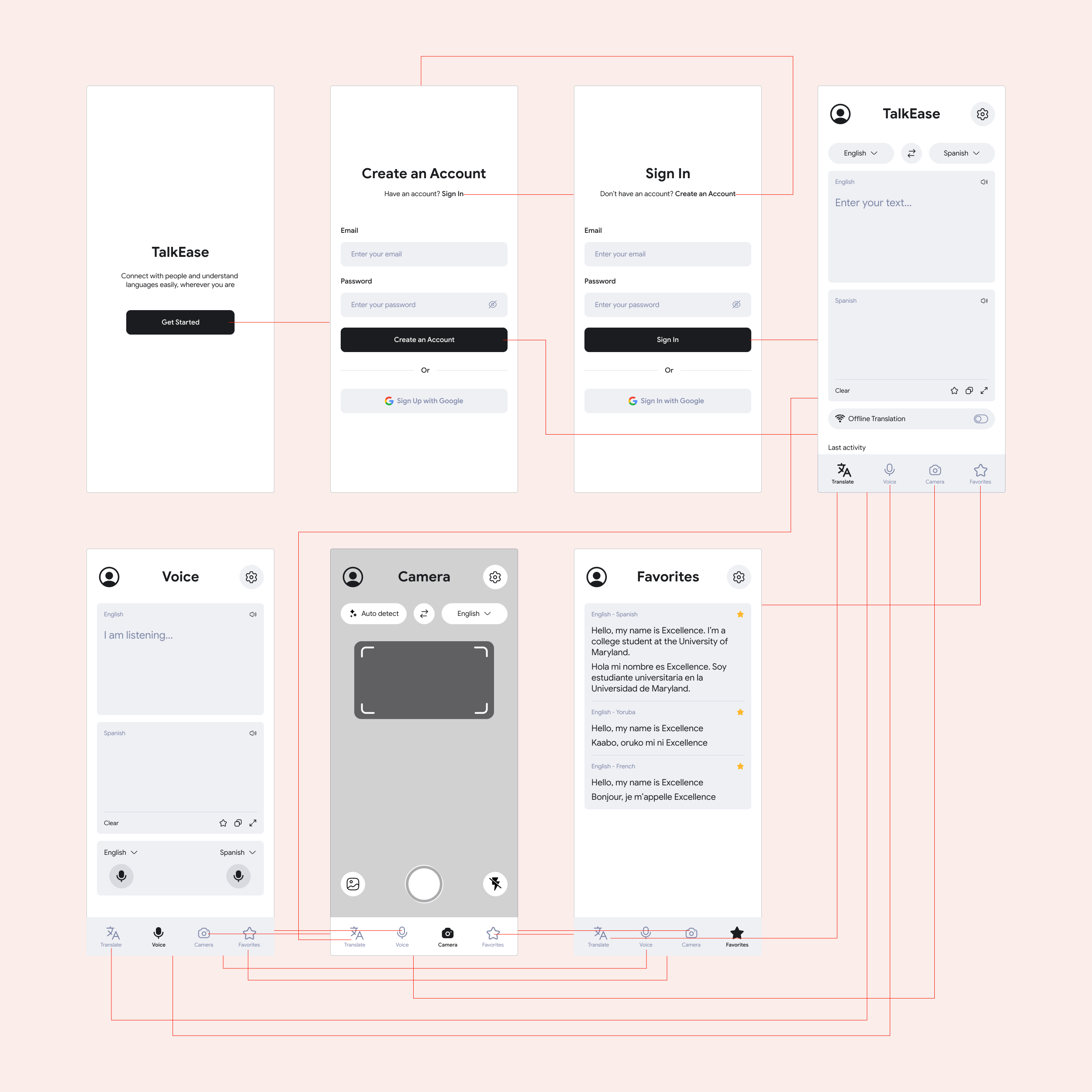
The interaction design flowchart maps the user’s journey through the app, from the first launch and account creation to each core feature. I used it to ensure navigation felt clear and consistent, with every screen leading naturally to the next.
The flow begins with onboarding → account creation or sign-in → the main translate screen. Four navigation tabs provide quick access to voice, camera, and favorites, while every mode connects back to the main translate screen so users always have a clear path forward.
See the full interactive prototype
Open prototype ↗User Evaluation & Feedback
I tested the prototype with people from different cultural backgrounds to understand how the experience worked for different users. I gathered feedback through two methods: the Critical Incident Method, where I observed moments of struggle or success, and surveys that captured users’ overall experience, what they liked, and areas for improvement.
01
Easy to use
Users found the app intuitive and praised the clean design. Navigation required no explanation during prototype testing.
02
Top features
Voice and camera translation were rated as the most useful features during prototype testing.
Outcomes
Language barriers can make everyday moments like school, healthcare visits, and conversations more challenging. I designed TalkEase to help people communicate more easily in those situations. Throughout the project, research guided each design decision. The app focuses on simple navigation, quick access to saved phrases, and camera translation for text that users do not need to type.
During prototype testing, users from different backgrounds found the app easy to use and helpful. While there are still areas to improve, such as clearer guidance and faster access to frequently used languages, TalkEase was built around the needs and feedback of real users.
Key Takeaways
01
Research drives better design
It can be tempting to jump straight into designing, but starting with surveys and interviews helped me make decisions based on real user needs. Features like the Favorites tab, simple navigation, and camera translation came directly from user feedback rather than assumptions.
02
Trust the process, even when it feels slow
Working through research, personas, and prototyping from start to finish showed me how each stage builds on the one before it. Although the research phase took the most time before any designs were created, it gave me the direction and confidence needed to make better decisions when designing in Figma.